
Starting State
Use the vizij-web workspace root:
cd /home/chris/Code/Semio/vizij_ws/vizij-webThis walkthrough uses apps/tutorial-agent-face, the maintained Vizij example that layers a live service loop on top of the same runtime foundation used in tutorial-fullscreen-face.
Scope note
Open this page only if your product really has an external session or service loop.
If you only need a local embedded face:
- stay with Minimal Web Player,
- use Application Integration Patterns to choose the lighter app shape,
- come back here only when a separate session layer is a real requirement.
Required And Optional Setup
Install dependencies once:
pnpm installIf you want the full live-session path, create the app-local env file:
cat > apps/tutorial-agent-face/.env.local <<'EOF'
VITE_GEMINI_API_KEY=your_google_ai_studio_key
EOF
Then start the app:
pnpm run dev:tutorial-agent-faceTwo valid ways to use this page:
- without
VITE_GEMINI_API_KEY, inspect the runtime shell and local interaction layers - with
VITE_GEMINI_API_KEY, complete the full runtime-plus-session walkthrough
What You Can Validate Without The API Key
The missing API key only blocks the live session layer. It does not erase the rest of the maintained app.
If VITE_GEMINI_API_KEY is missing | You can still validate | You cannot validate yet |
|---|---|---|
| session connection is intentionally unavailable | runtime loading, ready, and error states | live Gemini session connection |
| the face shell should still render | the provider/bootstrap shape in FaceApp.tsx | transcript or model-audio flow |
| the UI should still distinguish runtime status from session status | the boundary between useGeminiLive and useAgentFaceTools | tool-call round trips from the external service |
| the disconnected state is expected | local interaction layers and runtime-owned behavior | service-driven gaze, emotion, or mouth behavior |
If the page loads, the face becomes ready, and the UI reports a missing key or disconnected session separately from runtime readiness, the app is still teaching the right advanced-integration boundary.
The Pattern You Are Learning
This page teaches one reusable application shape:
- a stable Vizij runtime shell
- a separate external session layer
- a tool bridge that translates service events into Vizij runtime actions
- UI state that tells you which layer is healthy or failing
That is the whole advanced-integration idea.
Walkthrough
1. Launch the richer app and identify the runtime shell
Run:
pnpm run dev:tutorial-agent-faceOpen the local URL shown by Vite.
Expected result:
- the face appears through the same runtime-react foundation used by the simpler tutorial
- the UI has more controls and session-facing chrome than
tutorial-fullscreen-face - the app is clearly more product-shaped without being a different runtime model
Current visual anchor:
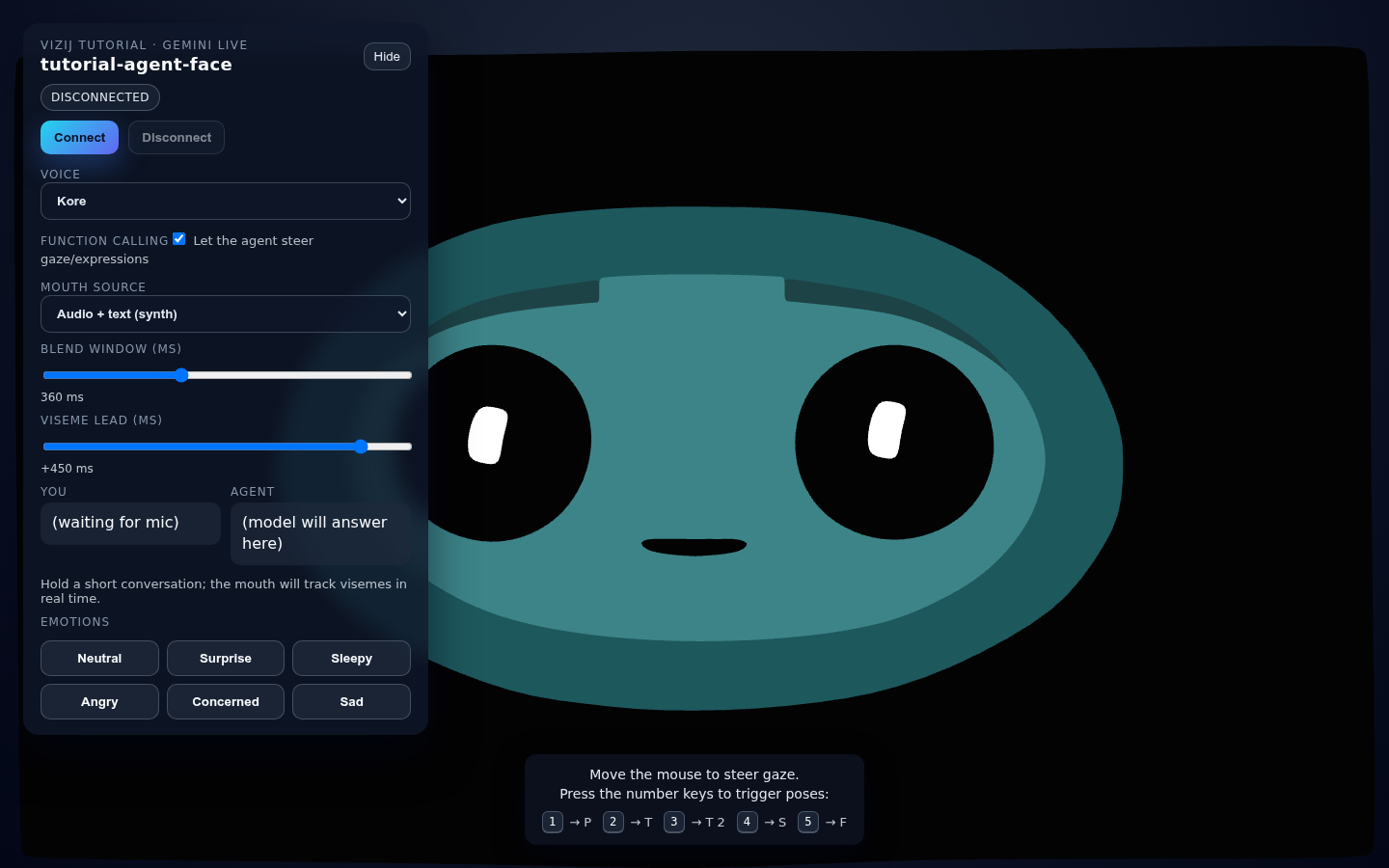
That is the point of using this capture here: it lets the page separate runtime readiness from session readiness before the live service path enters the story.
2. Separate runtime readiness from session readiness
Before connecting any live session, inspect the UI and app behavior.
What to look for:
- the face runtime can become ready even if the external session is disconnected
- a missing API key or disconnected session does not mean the runtime failed
- local behavior such as face presence, base interactions, and UI shell rendering still prove that the Vizij layer is healthy
This is the first advanced lesson:
- runtime readiness answers
can the face load and respond - session readiness answers
can the external service connect and drive richer behavior
Do not collapse those into one state.
3. Inspect how the app keeps the runtime foundation small
Open:
vizij-web/apps/tutorial-agent-face/src/FaceApp.tsxvizij-web/apps/tutorial-agent-face/src/hooks/useGeminiLive.tsvizij-web/apps/tutorial-agent-face/src/hooks/useAgentFaceTools.ts
The runtime bootstrap still looks like this:
export function FaceApp() {
  return (
    <VizijRuntimeProvider assetBundle={assetBundle} autostart>
      <AgentFaceRuntime />
    </VizijRuntimeProvider>
  );
}
That small bootstrap matters. The app becomes rich by adding layers around the runtime, not by replacing it.
4. Follow the live-service bridge in code
Inside FaceApp.tsx, look for the boundary between session logic and runtime logic:
const { tools, handleFunctionCalls, gazeActive } = useAgentFaceTools({
  enabled: ready,
  bindings,
});

const { status: geminiStatus, connect, disconnect } = useGeminiLive(
  audioManager,
  voiceName,
  {
    enableTools: toolsEnabled,
    tools,
    handleFunctionCalls: toolsEnabled ? handleFunctionCalls : undefined,
    systemInstruction: SYSTEM_INSTRUCTION,
  },
);
What this means:
useGeminiLiveowns the external sessionuseAgentFaceToolsowns the translation from tool calls into Vizij runtime actions- the face still moves through runtime helpers such as
setInput(...)andanimateValue(...)
This translation layer is the part you copy into your own advanced app.
5. Complete the full live-session path if you configured the API key
If VITE_GEMINI_API_KEY is configured:
- connect the session from the UI
- trigger a short interaction
- watch for transcript or session-state feedback
- observe gaze, emotion, or mouth behavior update through the face surface
Expected result:
- the session state changes independently from runtime readiness
- tool-driven actions become visible face changes
- the UI tells you whether the problem is in the runtime layer, the session layer, or the tool layer
If you did not configure the API key, stop after step 4 and treat the disconnected session as an intentional boundary, not a failed tutorial.
Why This Example Teaches Well
This app is the best maintained advanced guide because it shows all of these at once:
- the runtime shell remains recognizable
- a live service loop is clearly separate from runtime loading
- the tool bridge is explicit in code
- the surrounding UI helps diagnose where the system is healthy or failing
That combination is what makes it a reusable integration pattern instead of just a flashy demo.
Fast Recovery If It Fails
Use these shortcuts:
- if the face never loads, treat that as a runtime problem and compare against Hello Face Quickstart
- if the face loads but the session will not connect, check whether
VITE_GEMINI_API_KEYis configured - if the session connects but the face does not react, inspect
useAgentFaceTools.tsand compare the expected bridge shape in this page - if you need route-level healthy-state checks, use Validation Checkpoints
- if you need failure-driven recovery, use Troubleshooting Matrix
Recommended Next Steps
Continue to Rich Interactive Applications if you want the broader family of advanced integration patterns.
If you want to return to the simpler integration spine, go back to Minimal Web Player.