
Starting State
Use the vizij-web workspace root:
cd /home/chris/Code/Semio/vizij_ws/vizij-web
pnpm run dev:demo-vizij-player
Open the local URL shown by Vite.
This walkthrough uses demo-vizij-player because it is the strongest maintained example of a bundle-first player surface in the workspace.
Scope note
This walkthrough assumes a React app built on @vizij/runtime-react.
Keep the distinction clear:
- the lifecycle and validation lessons here are the portable part,
- the concrete code examples are React-specific,
- this page is about integration, not deployment.
Route Handoff From This Page
Use this page as the last stop before you branch, not as proof that every next step must stay inside Integrate.
| If this describes you… | Treat this page as successful when… | Open this next |
|---|---|---|
| you are not building in React | you can explain the VizijAssetBundle, provider-owned readiness states, and one working control path | Loading, Playback, and Embedding, then repo-local implementation docs for your framework |
| your next real question is operator control or deployment topology | you have one healthy player shell and one visible control path reaching the face | Deploy, then Easiest Standalone Deployment or Hardware, ROS, and Multi-Screen Topologies |
What A Minimal Player Must Prove
For this route, a player is only believable if it makes four things obvious:
- what face asset is loaded
- whether the runtime is healthy
- what the viewer is currently showing
- whether at least one control path reaches the face successfully
What This Page Does Not Solve Yet
This page does not yet solve:
- service-backed or session-backed behavior loops,
- non-React implementation details,
- operator-facing endpoint exposure,
- deployment topology choices.
That is the standard you are checking as you walk through the app.
Walkthrough
1. Launch the maintained player anchor
Run:
pnpm run dev:demo-vizij-playerWhen the app opens, choose one of the curated sample faces if it is not already selected.
Expected result:
- the app presents a clear player workspace rather than a fullscreen-only tutorial
- the face viewer, bootstrap state, and side panels are all visible
- you can tell that the app is built to host a bundle, not just show one canned animation
Current visual anchor:
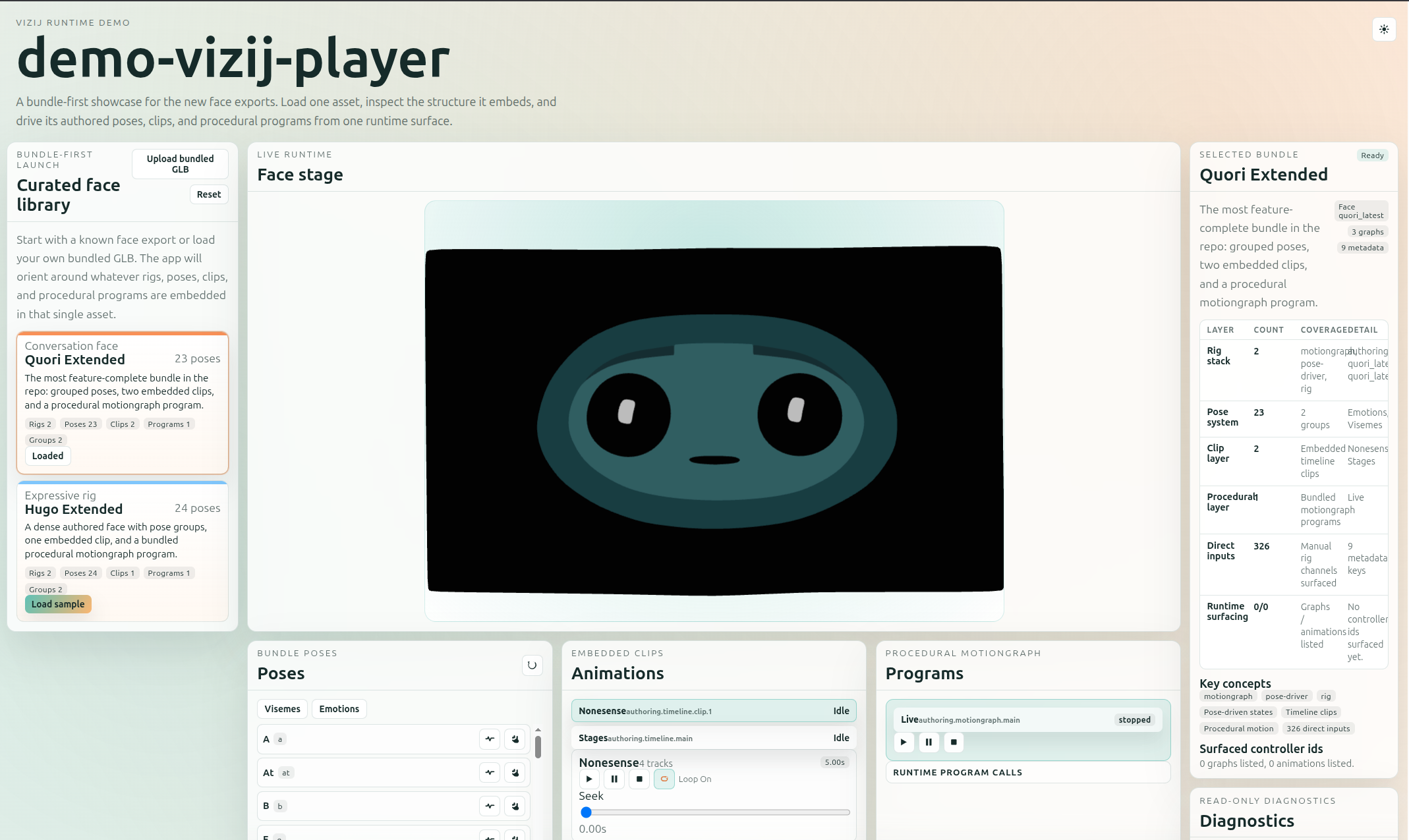
Use this overview to orient yourself before you zoom into the specific control and diagnostic surfaces below.
2. Read the player shell before touching controls
Look for the app surfaces that make the runtime honest:
- bootstrap or readiness checklist
- face viewer
- diagnostics and controller inventory
- pose, animation, or face-control panels
Expected result:
- you can see whether the GLB loaded
- you can see whether the runtime is ready
- you can tell the difference between loading, empty, ready, and error states
This is the core difference between a player and a thin tutorial surface. A player must explain its state while it is running.
Current shell-detail anchors:
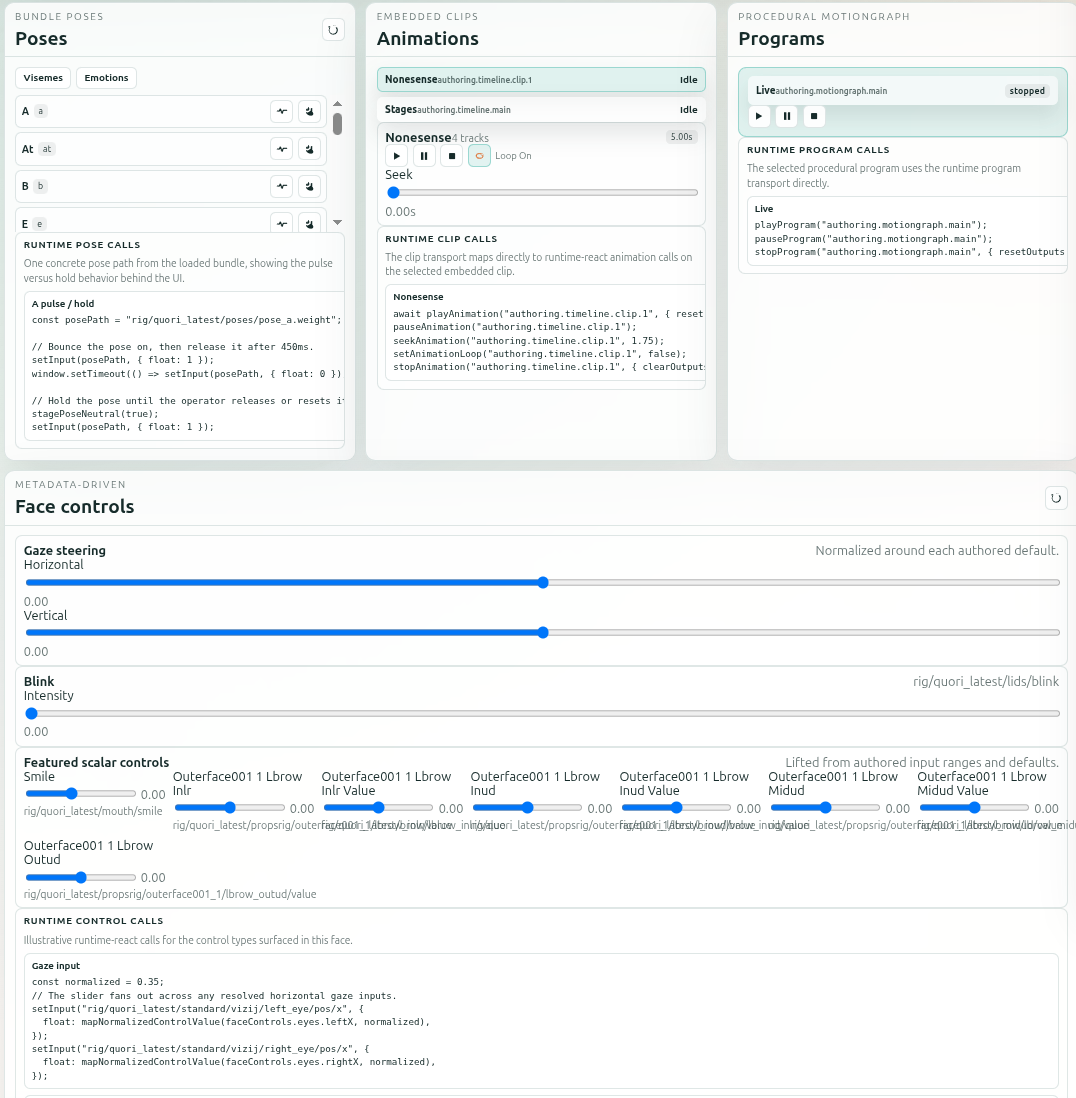
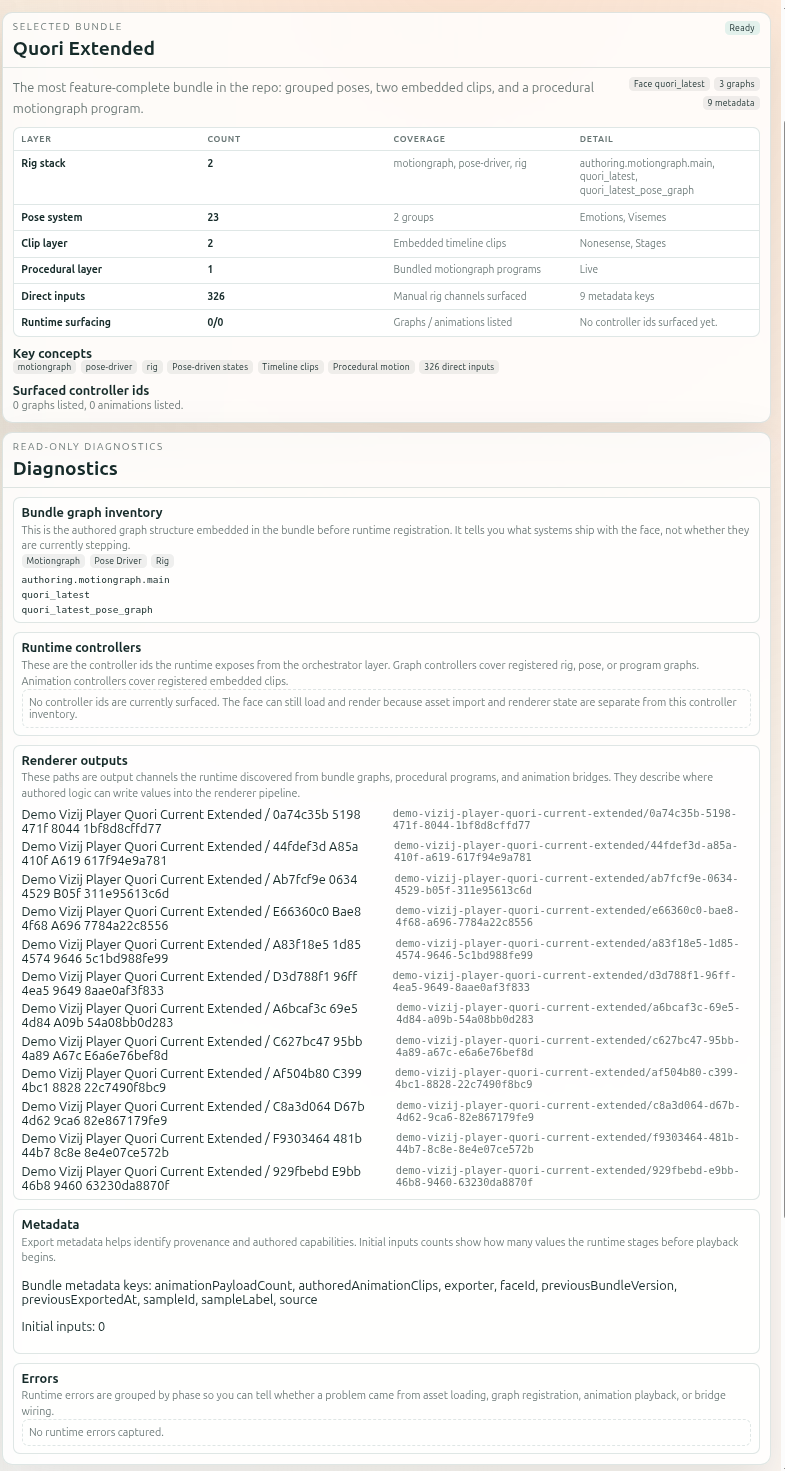
These two crops are useful because they separate the two teaching jobs that the full player screenshot compresses:
player-demo-controlsshows the bundle poses, clip transport, procedural program controls, and metadata-driven face controls that prove a control path is really present,player-demo-detailsshows the selected bundle summary and diagnostics surfaces that make runtime state inspectable instead of mysterious.
3. Prove that a control reaches the face
Use one maintained control path in the player:
- trigger a pose from the pose panel
- or trigger a simple animation or program if the currently loaded face exposes one
- or move a face-control value that the UI surfaces from runtime metadata
Expected result:
- the face changes visibly
- the app still reports a healthy runtime state
- the control feels like part of the player shell rather than an invisible side effect
That is the minimal player confidence test: one known-good control path has to work through the visible runtime shell.
4. Inspect how the app builds the runtime surface
Open:
vizij-web/apps/demo-vizij-player/src/App.tsxvizij-web/apps/demo-vizij-player/src/data/samples.tsvizij-web/apps/demo-vizij-player/src/components/DiagnosticsPanel.tsxvizij-web/apps/demo-vizij-player/src/components/PosePanel.tsx
The runtime shape to notice is:
<VizijRuntimeProvider
  key={source.id}
  assetBundle={assetBundle}
  autostart
  orchestratorScope="isolated"
>
  <WorkspaceSurface sourceLabel={sourceLabel} sourceMeta={sourceMeta} />
</VizijRuntimeProvider>
What this shows:
- the player still starts with one
VizijAssetBundle - the provider owns runtime startup and controller registration
- the app shell then builds panels from the resolved runtime state
That is the reusable pattern for a first player. The shell grows around the runtime instead of bypassing it.
5. Notice why this app is still restrained
demo-vizij-player is richer than tutorial-fullscreen-face, but it is still deliberately focused.
It is not trying to be:
- a full authoring environment
- a live conversation shell
- a deployment endpoint
It is trying to be a trustworthy bundle-first player. That scope discipline is part of why it teaches well.
What To Reuse In Your Own First Player
If you are building a first integration surface, copy these ideas before you copy visual polish:
- construct one
VizijAssetBundlefrom a known source - mount one
VizijRuntimeProvider - make loading, ready, empty, and error states explicit
- build controls from resolved runtime data instead of hard-coded assumptions
- prove one known-good control path before adding more product UI
Fast Recovery If It Fails
Use these shortcuts:
- if the face does not load, inspect the bootstrap and diagnostics panels before touching controls
- if the runtime is unclear, use Validation Checkpoints
- if the player reaches an error state, use Troubleshooting Matrix
- if you need the lower-level runtime explanation behind the shell, use Loading, Playback, and Embedding
When To Move On
Use these branch points once the player shell feels trustworthy:
- If you still need the runtime vocabulary behind loading, playback, and embedding, continue to Loading, Playback, and Embedding.
- If your own app needs local hooks, diagnostics panels, or sample-selection behavior, continue to Application Integration Patterns.
- If your product depends on an external session or live service loop, branch to API-Backed Interactive Application.
- If you are not building in React, stop here once the runtime shell model is clear, then switch to repo-local implementation docs for framework-specific assembly.
- If your next question is operator control, exposed endpoints, or deployment topology, jump to Deploy and continue from the deployment route there.
Recommended Next Steps
Continue to Loading, Playback, and Embedding if you want the fundamentals behind the player shell.
If your goal is a richer application pattern, continue later to API-Backed Interactive Application.
If your goal is operator-facing deployment instead of more integration depth, jump next to Deploy.